1
Select Your File
Open an image or video in Remove BG. Start with a clear, representative source.
Remove BG isolates your subject so you can build a cleaner image or video.















Remove BG connects a practical bg remove task with a publishing goal. These four video examples show how a new setting can change the way a subject is presented.
Turn One Take into Several Stories


Remove BG gives a presenter a different setting without another recording session. A bg remover is useful when yesterday’s room no longer matches today’s message. Plan your removebg edit around the final crop: leave space for captions, preserve gestures, and choose a quieter scene. Remove BG helps you judge the composition before you share it.
Let the Product Explain Itself


Use Remove BG when packaging or a demonstration deserves more attention than the set. A background remover can simplify the scene, but reflective labels still deserve inspection. Treat each bg remove pass as a product accuracy check. Before you remove background distractions, verify that the logo, handle, and surface texture remain recognizable in Remove BG.
Give the Explanation More Room


Remove BG can help position a speaker beside a diagram instead of a busy office. For a removebg lesson edit, plan where the presenter and teaching material will sit. Use a bg remover to reduce visual competition, not to hide useful props. Remove BG review should include the gestures that point learners toward the next step.
Keep the Movement, Rethink the Room
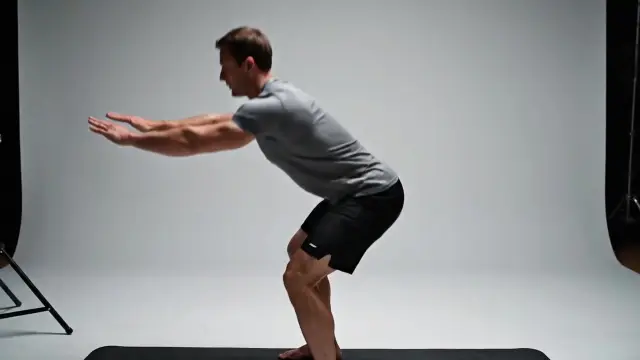

Choose Remove BG for a clear subject whose surroundings distract from the action. A background remover needs closer review where shoes meet the floor or arms cross the torso. After a bg remove edit, watch the fastest movement first. Remove BG helps you remove background clutter, but every difficult frame still needs review.
A useful removebg result is more than an empty backdrop. Remove BG puts the subject, destination, and final viewing conditions at the center of your review.
Remove BG routes images and videos into their respective workspaces. Choose a bg remover for the media you actually have rather than converting a useful clip into separate stills.
Remove BG separates background cleanup from cropping. When you remove background clutter, keep the framing you need; a bg remove edit should not cut away the story along with the setting.
Check a Remove BG result against both light and dark scenes. A background remover may leave visible halos that disappear on one color but become obvious on another.
Use Remove BG to compare a restrained setting with a busier alternative. Keep a removebg variation only when the background remover improves the message, not simply because the backdrop is different.
Remove BG is most useful with a sharp source and a distinct subject. Test the bg remover around hair and thin objects; remove background distractions without accepting missing details.
Review Remove BG output at its intended size. A bg remove result for a small social card may need different finishing than a large product image or presentation.
Choose a source, inspect the separation, and export only after review.
Open an image or video in Remove BG. Start with a clear, representative source.
Inspect the bg remover result around outlines, openings, and moving edges.
Review your removebg composition and use the available download options.
“For Nora’s archive work, Remove BG offers a way to reconsider the setting around an interview. A background remover should preserve meaningful gestures; the removebg review comes before any decision to reuse personal footage.”

Nora Hayes
Archive Producer
“For Priya’s social campaigns, Remove BG starts with the delivery format. A bg remove review at phone size can reveal distracting edges before the team schedules a post or requests another recording.”

Priya Okoye
Social Video Strategist
“For Marcus’s product work, Remove BG makes inspection the priority. The bg remover result needs recognizable labels and intact handles; remove background clutter only when the product itself remains accurately represented.”

Marcus Shah
Product Content Lead
“For Sofia’s learning materials, Remove BG supports a calmer composition. A removebg draft should leave diagrams legible, while the background remover review checks the hands and props that carry the explanation. Only remove background elements that compete with learning.”

Sofia Bennett
Learning Experience Designer
Check the displayed credits, export options, and billing period before choosing a plan.
For solo creators enhancing short videos
$117.60 billed annually
9,600 Credits
Get StartedPopular
For teams improving frequent video assets
$239.40 billed annually
57,600 Credits
Get StartedFor studios and high-volume enhancement workflows
$1,199.40 billed annually
360,000 Credits
Get StartedQuestions about your plan? Reach us atsupport@remove-bg.studio
Choose the right source, method, and export for your project.
Use Remove BG to isolate an image or video subject. Choose the background remover workspace for your file. Review your removebg composition before exporting: a bg remover changes the setting, not the subject itself.
Both bg remove and removebg are shorthand for background removal. Our brand is Remove BG. Use the appropriate bg remover to remove background clutter, make room for captions, or prepare a different setting.
Remove BG suits existing media; green screen depends on controlled filming; manual masks provide detailed control. Start with a bg remover, then finish difficult edges manually if your removebg result needs more attention.
Cropping changes the frame; a bg remover isolates its subject. Choose Remove BG when you need the full pose. A bg remove edit can remove background clutter without cutting away hands, products, or useful movement.
Give Remove BG a sharp original with visible outlines. A background remover has less detail to work with in compressed screenshots. For a removebg video check, include movement: the bg remover must work beyond one still.
Hair, glass, and blur deserve closer inspection. Test Remove BG against contrasting colors. If your bg remove pass loses detail, improve the source or finish manually. A bg remover cannot guarantee every difficult edge.
Your viewer may display transparency against white. Test the removebg export over another color. In Remove BG, select a transparency-capable format when available; white alone does not prove that the background remover could remove background pixels.
Transparency depends on the codec and receiving editor. Check Remove BG export options before planning layers. For a bg remove delivery, test the downloaded file: a background remover preview cannot confirm compatibility with your editor.
Remove BG can simplify a product composition. A removebg product edit should preserve labels and proportions. Inspect the background remover result; remove background distractions only if shoppers still understand scale and included accessories.
Play your Remove BG clip, then pause at gestures and overlapping limbs. A bg remover can vary across frames. Complete the bg remove review at delivery size before you remove background context from a published clip.
Start with the workspace options in Remove BG. Before a larger removebg job, check credits and downloads. Each background remover mode may have different limits; confirm these before you remove background elements across multiple assets.
Compare Remove BG output with the original and confirm permission to use it. Complete your bg remove review on the downloaded file. If you remove background context, check that the finished composition remains accurate and believable.
Bring one image or clip to Remove BG. Start with the moment that matters.